A pipeline for long-form narrated documentaries in two parts. A script engine researches, plans, writes and checks the text, with separate AI roles in clean contexts and deterministic linters. A video studio turns the finished script into a film: storyboard, reference images that a person approves, frames, narration, sound, montage and a publish package. The pipeline's first generation produced the videos of my YouTube channels.
Results at a glance
4.7M+ viewson my YouTube channels, with videos made by the first generation
1.13M+ watch hourson the same channels
27.6k+ subscribersacross the same channels
Project facts
RoleDesigned and built with AI coding agents. I wrote the specs and the editorial rules, made the product decisions, accepted the work on real productions, and run it.
PeriodSince June 2025; rebuilt in 2026: script engine from May, video studio in September
AI and dataLLM pipelines with separate roles and clean contexts, image and video models, a text-to-speech service, local models for cleanup and camera moves, YouTube Data API
01
Problem
A long-form documentary runs 35 to 70 minutes. It needs a researched script that holds a listener when it is read aloud, then 400–600 frames that keep the same faces, rooms and period, narration, music, a cut, and finally a title, description and thumbnail.
Language models speed up every one of these steps, but left alone they fill the text with stock phrases and claims stronger than the sources, and they redraw faces and rooms differently from frame to frame. The first generation of the pipeline proved the format on my channels, but it had grown into a large monolith.
02
What I built
Two parts with a hand-off between them. The script engine is a set of instruction files and Python linters that AI agent tools run: the writer, the reviewer and the fact-checker are separate roles with clean contexts, and the linters measure the text in between. The video studio is a local web app that turns the finished script into a film and a publish package. A person approves the references before frames are generated in bulk and picks the cover.
Illustration. Simplified pipeline from research to the publish package.
03
Key parts
First generation: YouAutomate
YouAutomate was the first generation of this pipeline, end to end: script, voice, visuals, assembly and a publish package. It produced the videos of my YouTube channels, in Russian and Spanish versions.
Those channels reached 4.7M+ views, 1.13M+ watch hours and 27.6k+ subscribers.
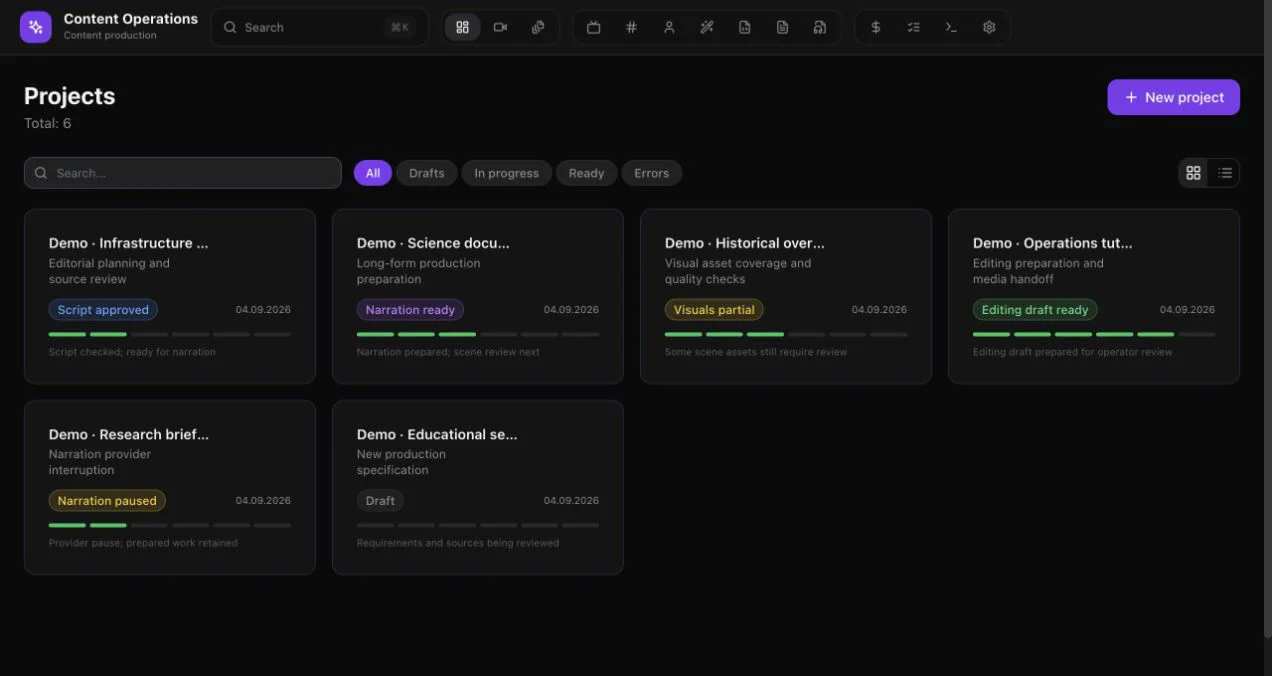
Demo data. Generation 1 interface (YouAutomate).
By then the first generation had grown to ~132k backend lines, 353 endpoints and 695 tests, with much of its logic in one large service. Its video part was rebuilt cleaner and faster as the studio described below: in about 8 days, with a modular design, a durable job queue in PostgreSQL in place of Celery, and an approval gate before frames are generated in bulk. The new backend is about 5× smaller.
Script engine: separate roles, clean contexts
One instruction file sets the whole process, and it runs unchanged in several AI agent tools. I give a topic; the agent researches, plans and hands the plan to a separate writer, then the result is measured, reviewed and fact-checked by other roles. 17 niche profiles set the audience, the narrator's voice, the clichés to avoid and the quality bar for each format; 5 of them have produced scripts so far.
Research builds a fact register: every claim with its source and the type of source, and two independent sources for any fact the story rests on.
The plan is capped at 13,000 characters and checked by a script: the scene budgets must add up to the target length within ±5%.
The writer gets only the plan and a short instruction of about 900 words, in a clean context. The text is written by a writer, not assembled by code.
A cold listener, a fresh agent that sees only the script, writes a one-page report: the top ten places where a listener would leave, each with its minute and a fix (delete, shorten, move or add a scene).
A subtract pass may only delete: it removes explanations and neat closing lines that add no new fact, action or line of dialogue.
An independent fact-checker with web access opens every cited work. It found errors the author had missed in three consecutive stories; they go back into the edit round before release.
The last gate is a person: I listen to the first five minutes and the finale through the production voice.
The design went through four versions, each change justified by a measurement, and the removed parts were archived rather than deleted. One finding shaped it: a writer agent that read the banned-phrase list before every line produced signposts such as "and here…" in the dozens, while a plain chat that never saw the list produced none, and checks after every scene interrupted the prose 103 times per text. So the writer never sees the list; deterministic linters and fresh readers find the problems afterwards.
The engine has produced 52 scripts in 18 weeks across its four versions: 43 in Russian and 9 Spanish adaptations, about 308,000 words.
Quality checks: 6 Python linters and editable phrase lists
Six Python linters check the plan and measure the script after it is written. The phrase lists behind them are plain text that a non-programmer can edit: a new stock phrase that jars the ear goes into the list as one line.
draft ▸ “To understand what happened that night, we have to go back twenty years. And here is where it gets strange. Worth pausing on this: at 9:40 the lamp went dark.”FAIL opening · run-up in the first 300 words: “To understand what happened…”FAIL signposts · 2, cap 0: “here is where”, “worth pausing on”FAIL digits · 1, cap 0: “9:40”, numbers are written as wordsPASS headings · 0PASS paragraphs · none over 120 wordsfix ▸ delete first: “Twenty years earlier…” · “At twenty to ten the lamp went dark.”
Illustration. Linter output on a made-up English paragraph; the real phrase lists are in Russian and Spanish.
Mechanical checks: length within ±10% of the target, no digits (numbers are written as words for the voice), no headings, no paragraph over 120 words, and caps on filler words.
Phrase lists: 99 Russian and 39 Spanish patterns of stock AI phrasing, and 48 patterns for how heavy content is presented. Any hit in the first 300 words, about two minutes of audio, fails the script; quoted speech of a source or a character is exempt.
A density cap of 4.0 per 1,000 words for "not X, but Y" contrasts. Delivered scripts had measured 5.6–7.3; one received text hit 9.4, with 65 repeats of a single figure, and the check caught it in a second.
Every story cites published work inside its scenes: who, what year, which work, where it was published and what it established. The citation check was calibrated on the delivered scripts: 38 of 42 passed, and all 4 failures were confirmed as real.
The table of caps is frozen: a new kind of problem goes to a fresh reader, not into another cap or regex rule.
A/B tests of writer rules, judged blind
A new citation rule for the writer was tested in a blind A/B test before it was adopted. One plan for the same act of a made-up story, two fresh writers, one with the current instruction and one with the new; a third agent judged both texts without knowing which rules produced which.
Blind A/B test of writer rules: two rounds, judge scores given as new rule vs current rule
Round
Rule tested
Blind judge, new vs current
Outcome
1
New writer rules, including full citations inside the story
Retention 8 vs 9, atmosphere 8 vs 9
Rejected: the text written with the current rules scored higher
2
A revised citation rule: start from what is happening to the hero, split the argument from the publication details, keep it off the peak of fear
Retention 9 vs 9, atmosphere 8.5 vs 8, citation organicity 5–6 vs 4–5
Adopted into the writer's instruction
The result is stated with its limit: one text per side, so the difference is within noise, and audience retention has the final word.
Video studio: from finished script to rough cut
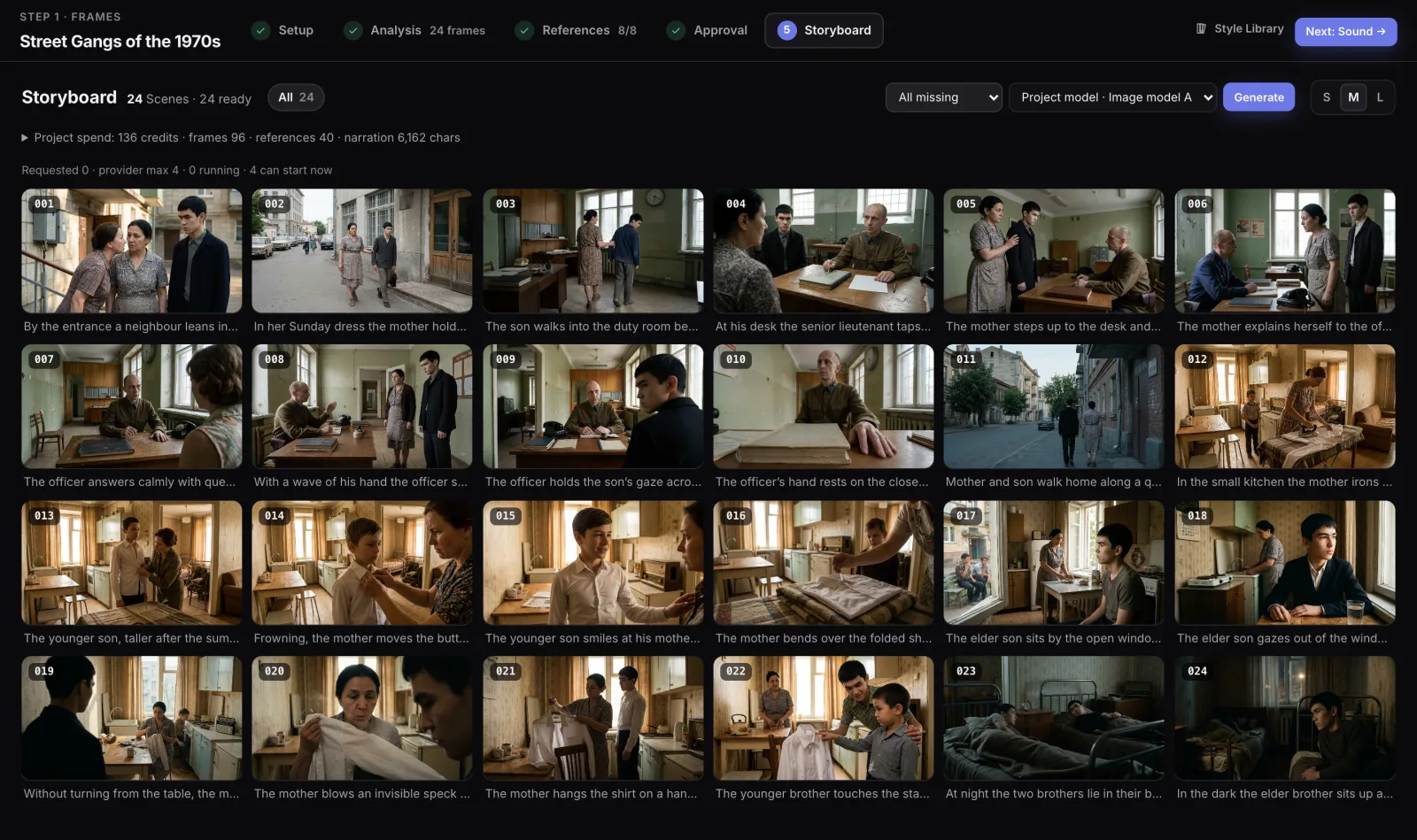
A local web app for one operator. The script goes in as a revision that never changes. The Director, the studio's planning LLM, splits it into an exact number of scenes and writes the visual direction for the whole film, for each sequence and for each shot. A film has 400–600 frames.
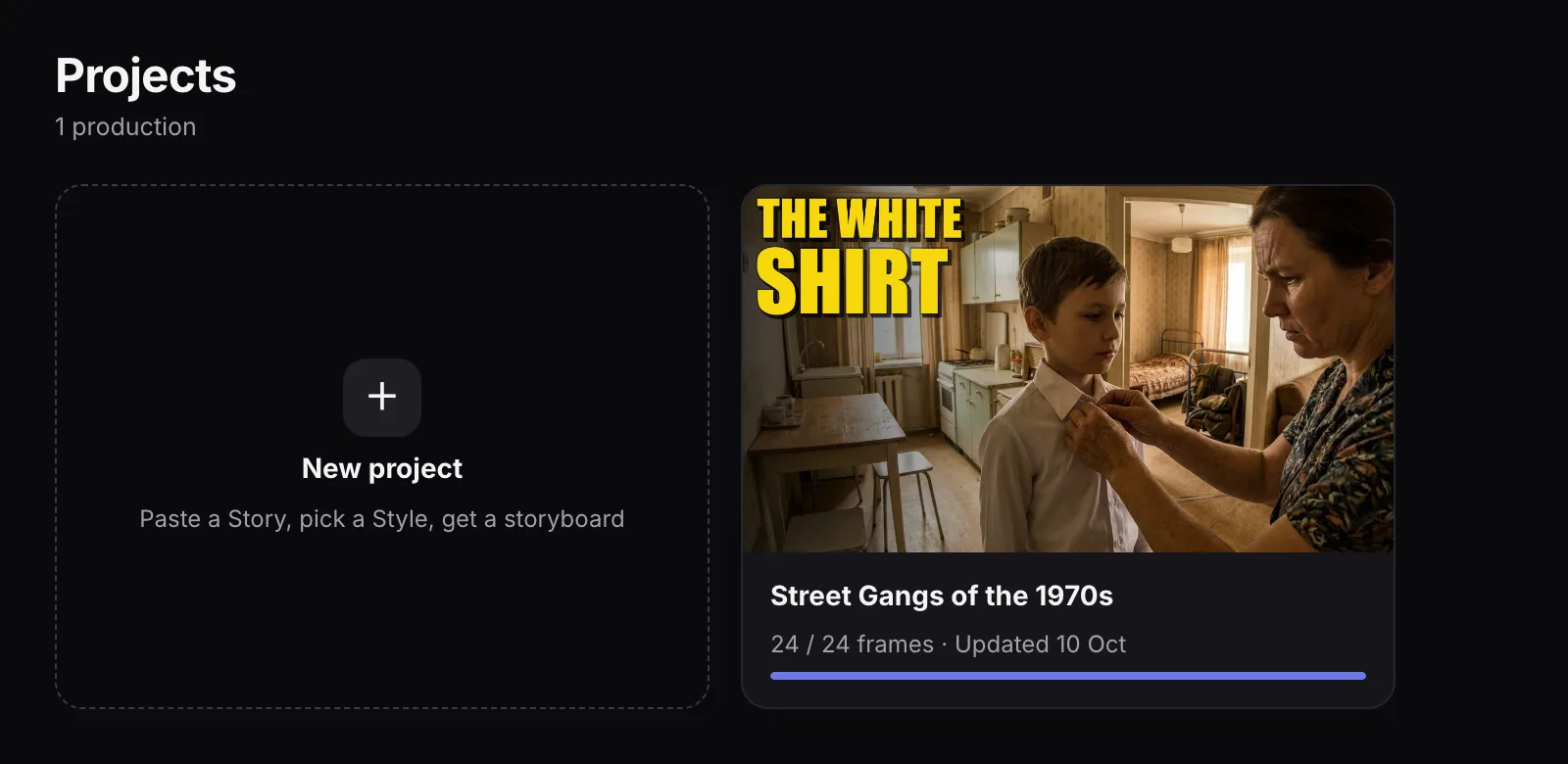
Sample project. One project per production, with its cover and frame progress.Sample project. Storyboard with an exact frame count, batch controls and project spend.
Exact-count planning: a request for 520 scenes returns 520. Every scene maps back to its exact span of the script with no cut inside a word, and the planner works in chunks of up to 24 scenes per call.
Continuity rules learned from reviewing a real film of about 500 frames: the same set and the same face for recurring places and roles, and a period label on every frame to keep out objects from the wrong era.
Frames are generated in batches by scope (all missing, failed, selected, a range or every n-th frame) with version history. A local eraser removes a stray object in about a second at no cost.
Optional animation: image-to-video for selected frames, or a free local 2.5D camera move in 1–2 seconds per frame. Spend is tracked per model and per kind of work.
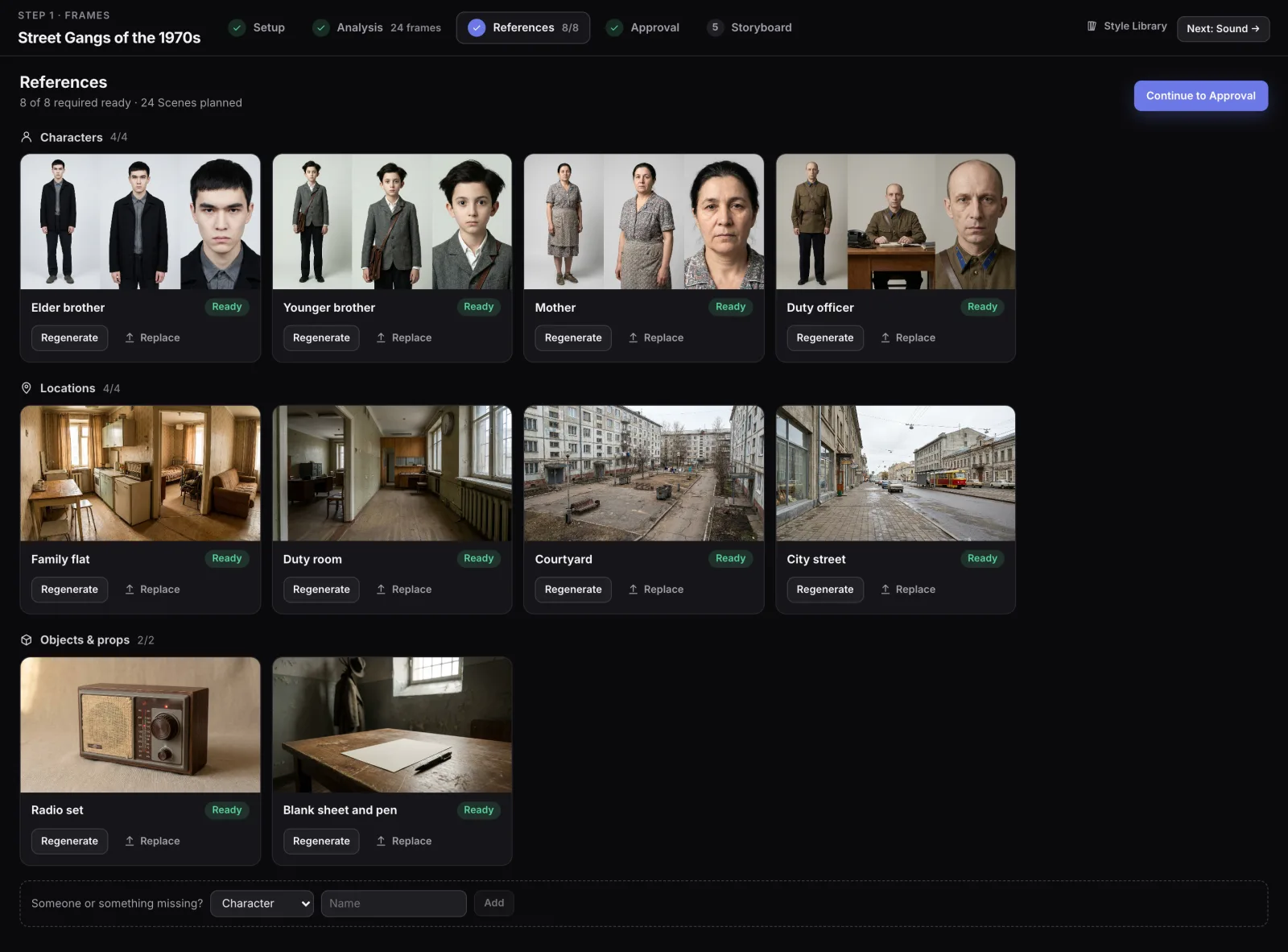
Sample project. Reference images wait for a person's approval before frames are generated in bulk.
Identity sheets for each character (full, medium and close views), multi-view sheets for locations, and key objects.
A person reviews, replaces or adds references and then gives explicit approval; mass frame generation cannot start before it.
A new look for a character marks as stale only the frames drawn with the old reference.
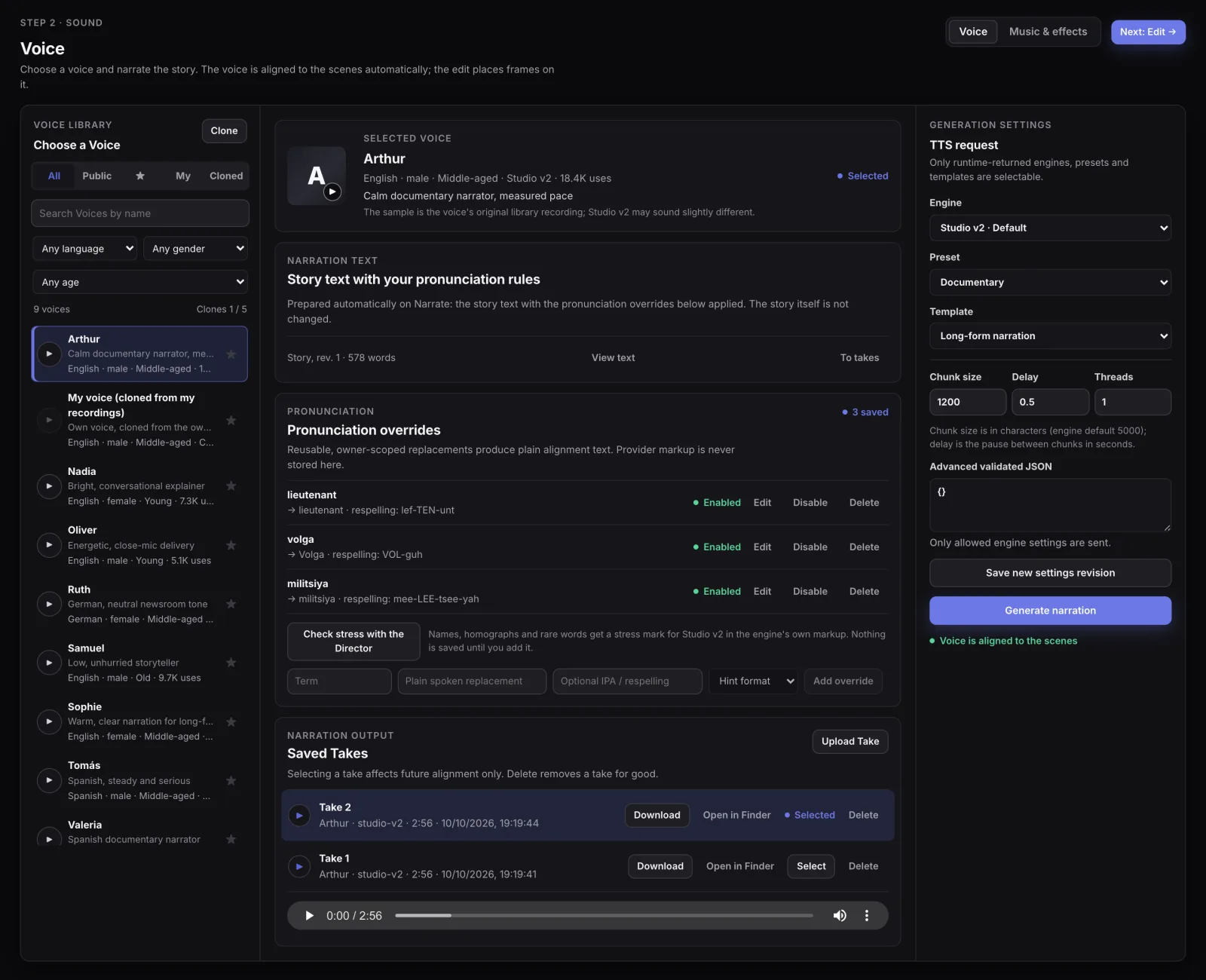
Sample project. Narration with pronunciation overrides; the voice library includes my own cloned voice.
The narration is voiced in pieces that end on scene boundaries, joined with exact pauses.
Pronunciation overrides for names and rare words, and an LLM stress check that proposes marks; nothing is saved until the operator adds it.
The narrator can be my own voice, cloned from my recordings.
Word timestamps from the voice track put every cut inside a real pause and produce captions of up to 42 characters.
Music and effects: the LLM proposes music sections and sparse effects, rules check and repair the plan, and the mix sits about 22–24 dB (music) and 12 dB (effects) under the voice.
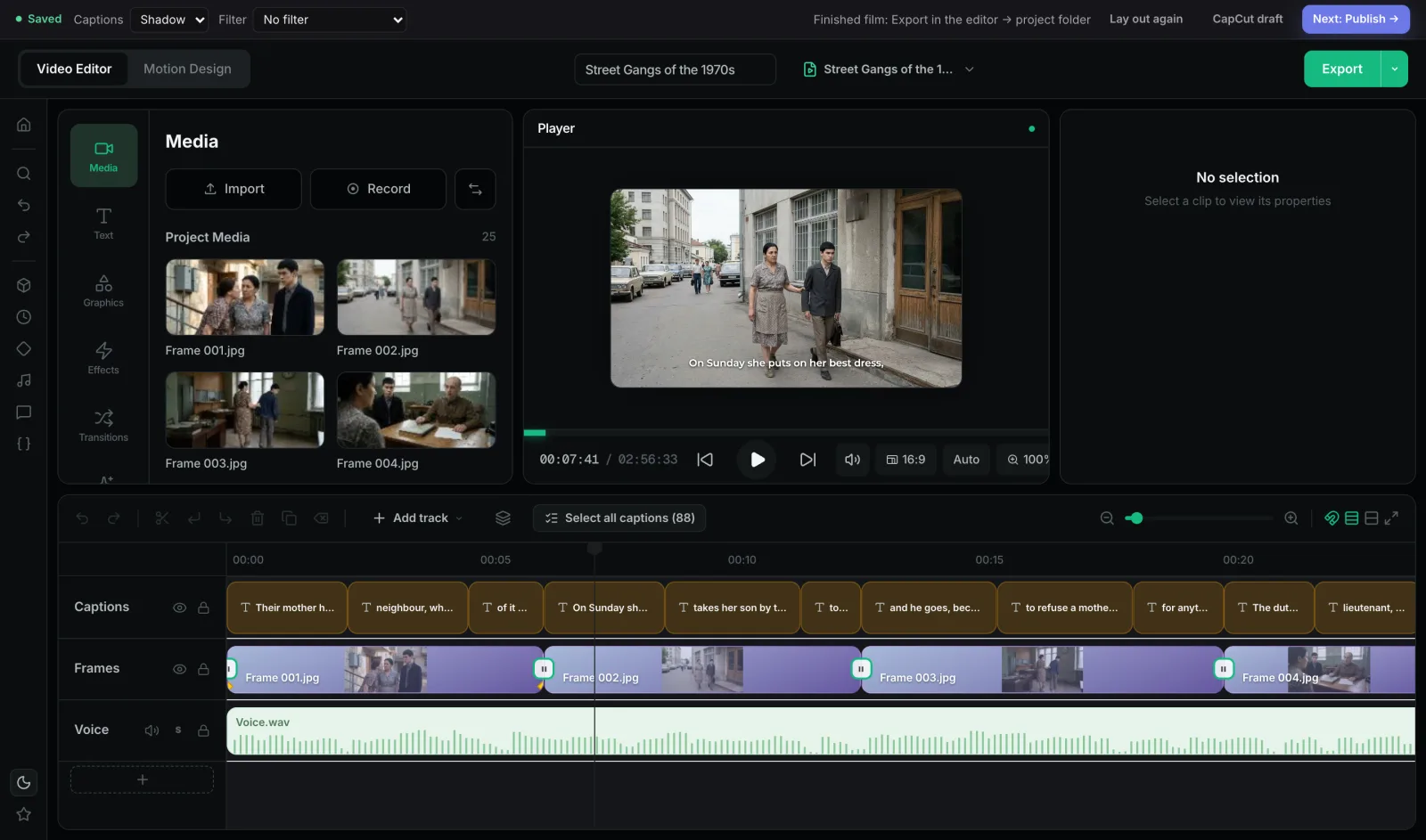
Sample project. Automatic rough cut in the built-in editor, ready to export or to hand over as a CapCut draft.
The film is laid out automatically in an embedded open-source editor (OpenReel, MIT): frames on the narration timing, voice, music, captions, camera moves and transitions.
Manual edits are kept when frames are updated, and a 48-minute film exports in about 7–8 minutes into the project folder.
The cut can also go to CapCut as a draft through a paired local connector.
Publish package and topic research
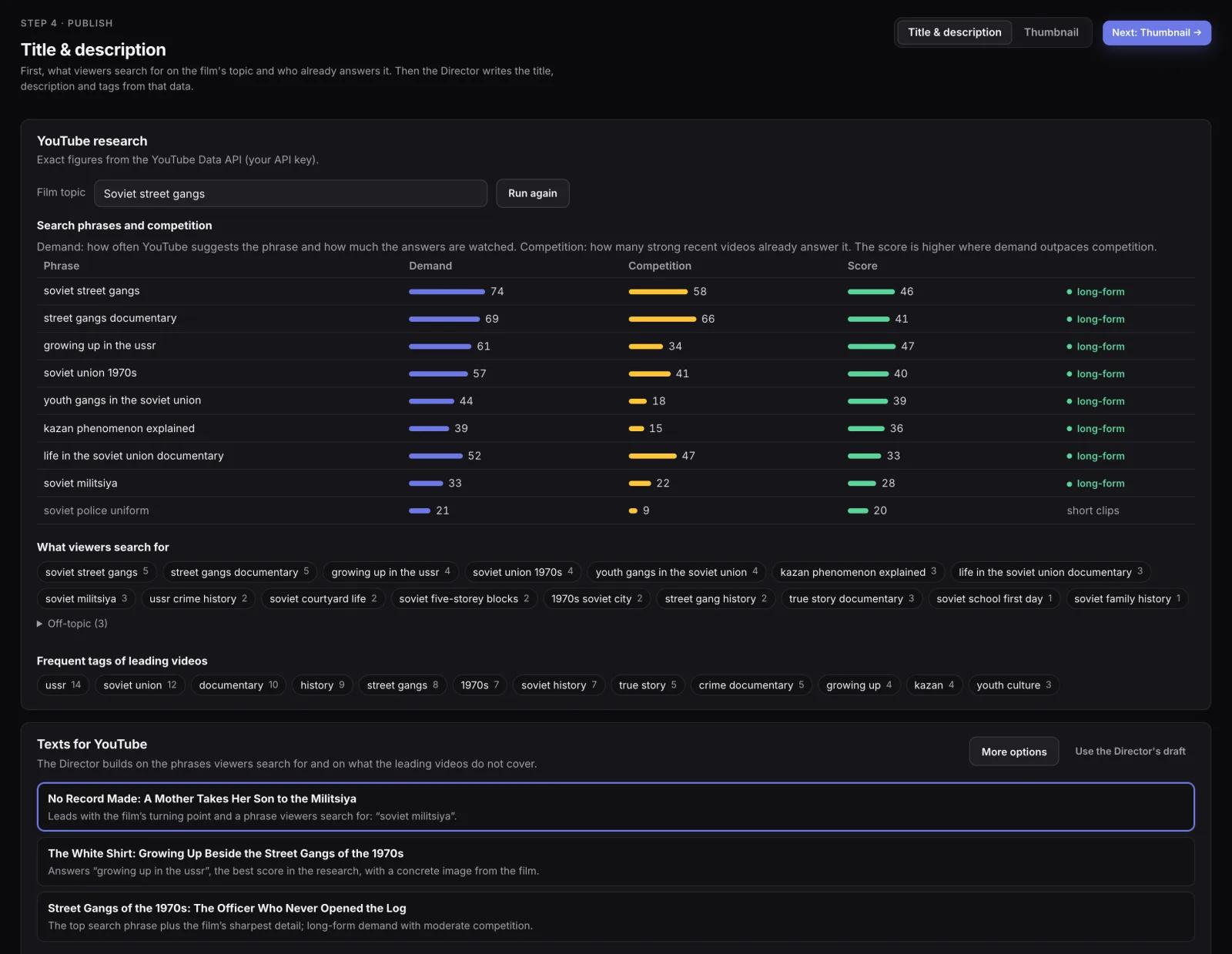
Before the texts are written, the studio researches the film's topic. It scores search phrases by demand against competition, so the score is higher where demand outpaces competition, lists the frequent tags of the leading videos and finds breakout videos that outgrew their channel (views divided by subscribers). Video and channel figures come from the official YouTube Data API.
Sample project. Topic research and the Director's title options, each with its reason.
The Director writes 3 titles with a reason for each, a description, chapters with real times, tags, hashtags and a pinned comment as validated structured output, with titles of up to 70 characters and facts from the story only.
Code enforces YouTube's rules afterwards: chapters start at 0:00, sit at least 10 seconds apart and come three or more or not at all, and tags fit in 480 characters.
The package also has an SRT subtitle file and a YouTube Studio checklist that includes the disclosure for altered or synthetic content. The studio does not upload anything; a person publishes.
Reference-based thumbnails
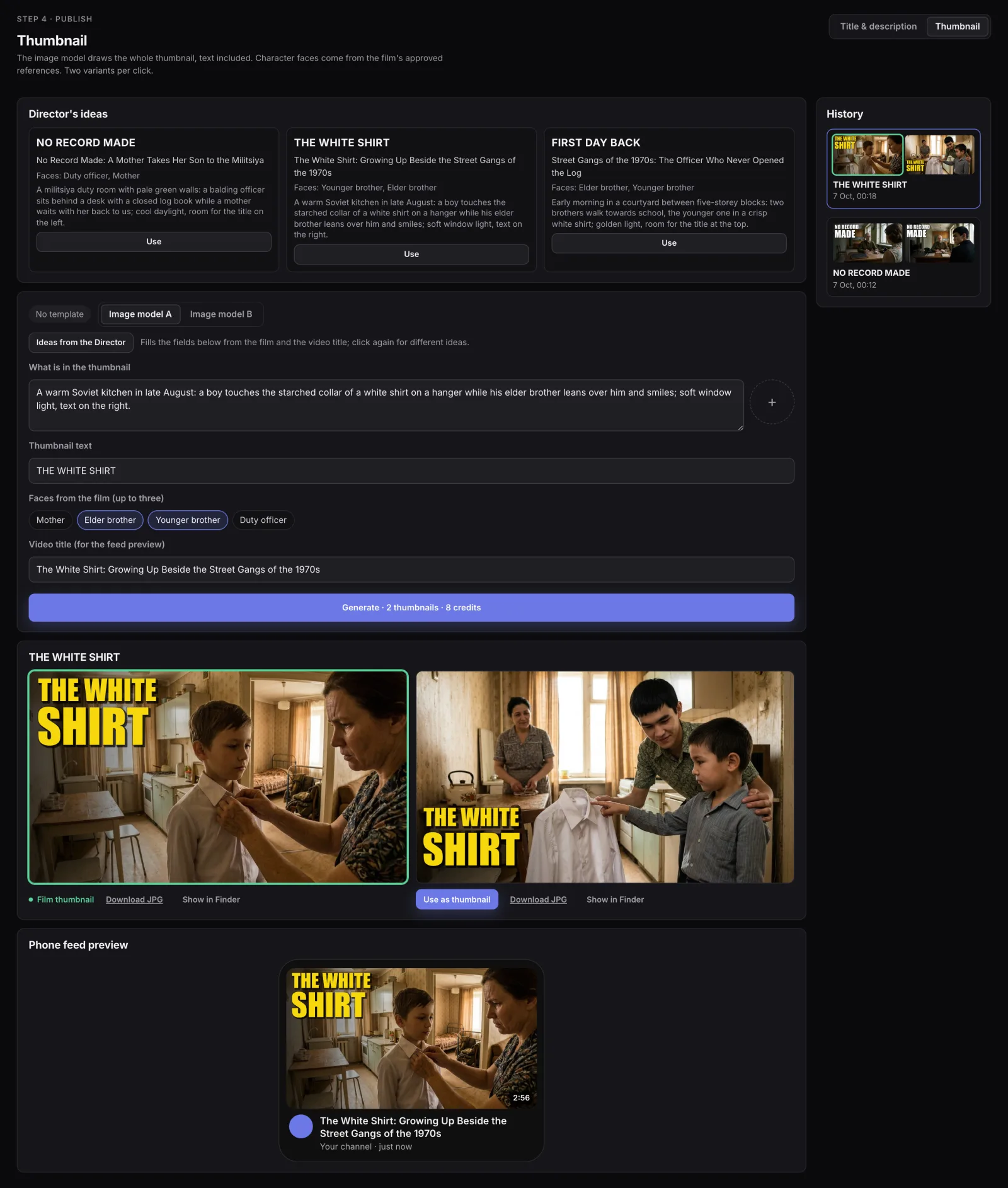
The Director proposes cover ideas grounded in the story, the title and the research: each idea has two to four words of cover text, a picture description and up to three people from the film. The image model draws the whole cover, text included, with faces taken from the film's approved references, so the people on the cover match the film.
Sample project. Cover ideas from the Director, two variants per click and a phone feed preview; the covers shown are demo covers.
Prompt rules: one strong moment, no collage, strong contrast and a focal point, and facts from the story only.
Two variants per click, generated in parallel within the provider's limits; every generation is kept in the history.
A person picks the cover and checks it in a phone feed preview.
Export as a YouTube-ready 1280×720 JPEG under 2 MB.
04
Reliability and guardrails
Jobs survive restarts: PostgreSQL owns the job queue, with leases, heartbeats and requeue of expired leases, and a batch can be paused, resumed or stopped at a safe point without losing finished work.
Nothing is regenerated silently: every change to the story is a new revision, and the frames, narration and cuts that depend on it are marked stale for review.
A rate- and budget-aware scheduler reads the provider's plan at run time and shares its limits across every kind of job.
Provider keys are encrypted in the database and never reach the browser.
The studio has 397 backend and 119 frontend test cases, including structural tests at 520 scenes and database migration tests.
Editorial rules in the script engine: no invented quotes for living people, every number traceable to a source, a disclosure line right after the opening scene, and heavy content kept off-screen. Scripts check what can be checked.
05
Results
52 scriptsfrom the script engine in 18 weeks, in Russian and Spanish
8 daysto rebuild the video studio: 61 tables, 159 endpoints
In the script engine, the earlier design took about 1M tokens and about 1.5 weeks per story, with a raw result. With the simpler design it takes a plan in tens of thousands of tokens, writing in a clean chat and mechanical checks in about a second, and the operating target is 1–1.5 hours of agent work per story. In the studio, a real film of about 500 frames went through review, and a 48-minute film exports in about 7–8 minutes.
06
What's next
Compare the minute of every citation with the audience retention graph, so the writer's rules are judged by what viewers do.
Run the studio on a server: the deployment path is documented, and today it runs locally.
CapCut export on Windows; today the connector runs on macOS.
Settle how fixed frame timing handles narration of a different length.